Have you heard about AI replacing programmers? So have we. Our experience though says it isn’t really happening, at least for now.
After more than a year of actively using AI in development of multiple projects, we’ve saved countless hours per developer. But our developers haven’t gone anywhere, they’ve just stopped writing the same code hundreds of times.
AI doesn’t write your product for you. It is perfect though for replicating the boring, repetitive code that developers hate anyway. Database handlers, CRUD operations, boilerplate tests. The actual creative thinking, solving business problems, is still handled by the human mind.
We built an AI setup tailored to our codebase using Cursor Rules and GitHub Copilot custom instructions. These tools don’t “learn” our codebase in the traditional sense, but they let us define persistent instructions that the AI applies every time it generates code.
This gives the AI enough context to follow our architecture, naming conventions, and coding standards, which results in faster, more consistent output.
Let’s see how it works.
How AI Helps the Development Process
Many of our clients have agreed to us actively using it in development. So far, we found these functions the most helpful:
Generating Repetitive Code
We tracked our developers’ time for a month and found that roughly 60-70% of their time was spent on repetitive coding. Which costs time, money, their mental health and mindspace for creative thinking.
If we simplify how products are being built, essentially they are constructed with code blocks. Developers write the same types of code over and over to cover basic functionality. You write a database handler for retrieving users. Then you write basically the same handler for retrieving products. Then for orders. Then for invoices. The logic is nearly identical (only the field names change).
AI brought us the perfect fix for this particular problem. Using Cursor Project Rules and Copilot repository instructions, we defined the patterns we use for these repetitive blocks: how we structure handlers, how we name things, what error handling looks like, and how tests should be organized.
Now the AI generates these code blocks automatically, already aligned with our standards. Developers focus on the 20% that makes each feature unique, and instead of spending hours writing boilerplate, they spend about 30 minutes reviewing and adjusting what the AI produced.
AI in Onboarding
This has also made onboarding easy, because our AI assistant also functions as a knowledge base for new hires. Because Cursor can store our processes, patterns, and expectations in Project Rules and AGENTS.md, new developers can ask the AI questions and receive answers that reflect how we work.
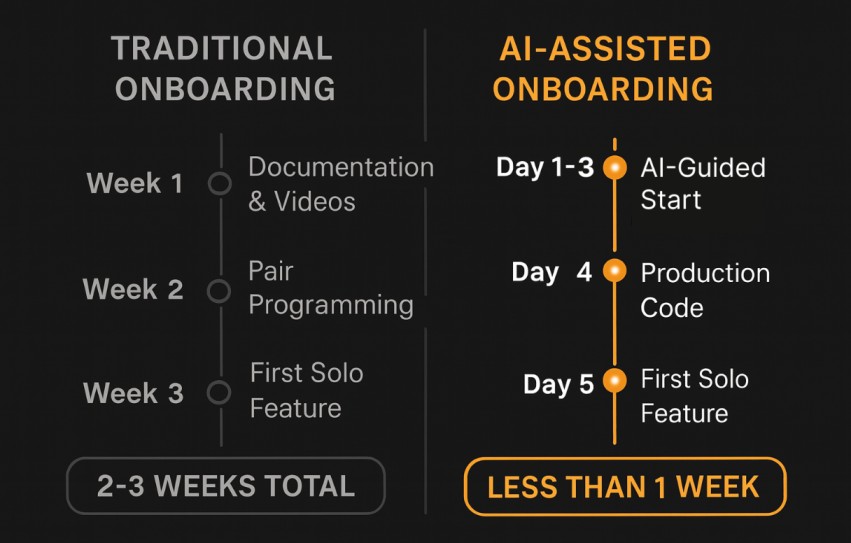
This means new team members spend less time guessing how things should be implemented. In most cases, they become productive in under a week because the AI guides them toward the correct patterns from day one.
Code Reviews
Before using AI, code reviews were exhausting for everyone involved. A senior developer would spend 2-3 hours reviewing a feature, finding 15 issues the junior developer had to fix, and then needing a second review after the fixes. Most issues were consistency. “You named this variable wrong. You didn’t follow the base class pattern. You forgot about the error handling here. Your test structure doesn’t match our standard.” It’s demoralizing for junior developers who feel like they can’t get anything right. It’s frustrating for senior developers who feel like police instead of architects. And it’s expensive (4-6 hours of senior developer time per feature review).
With AI, most of this is handled before a human ever sees the code. The generated code already follows naming conventions, uses the right base classes, includes proper error handling, and has the correct test structure. The reviewer doesn’t have to check whether someone remembered to add error handling. They know it’s there because AI generated it according to our standards.
We tracked review times across multiple projects and found that the average review process became up to 80% faster after introducing AI-assisted checks at the pull-request level.
Developers are getting it right the first time because AI is teaching them the right patterns from the start.

Why a Generic LLM Isn’t Enough
Everyone has access to powerful models like Claude 4.5.
So why do some engineering teams get dramatically better results than others?
The answer is context.
A generic LLM gives generic answers. It doesn’t know your architecture, your naming conventions, your testing structure, or how your team builds features. You can force it into the right direction with long, detailed prompts, but the output still needs adjustments. And the next developer will get a different answer and repeat the same cycle.
That’s why generic AI helps once, but never becomes a reliable part of your development workflow.
Why We Use Claude 4.5 Inside Copilot Premium
We don’t use standalone public models.
We use Claude 4.5 running inside GitHub Copilot Premium, because it gives us:
- Microsoft’s enterprise-grade infrastructure
- Tenant-level data isolation
- Strict access controls
- No use of our prompts or code for model training
- Encryption, auditing, compliance, and end-to-end protection under Microsoft’s SLA
Using Claude 4.5 this way is significantly safer than using the same model on a consumer plan. Copilot Premium adds Microsoft’s enterprise security layer on top, which means:
- All prompts and outputs stay inside our Microsoft tenant
- None of our data is used to train Anthropic or Microsoft models
- Identity, access control, and logging are handled through Azure AD / Microsoft Entra
- We get consistent enterprise compliance, audit trails, and encryption by default
This gives us the confidence to use AI deeply in our development workflow without risking data exposure.
What This Means for Business
Let’s translate technical metrics into business outcomes, because that’s what actually matters.
1.Speed to market changed dramatically
Traditional feature delivery takes significantly longer without AI assistance. With AI-assisted approach, similar features ship in half the time in some cases. That means while competitors are still working on their initial launch, you’re already testing customer reactions, iterating feedback, and shipping your next version. You’re moving faster at every stage of the development cycle.
This is going to change very soon, as companies are focused on automating their development, so for now, having this edge is a big bonus.
2. Quality improved in ways we didn’t initially expect
Fewer bugs reach production because AI-generated code follows tested patterns. Consistent code makes maintenance easier. When everything follows the same structure, debugging takes minutes instead of hours. Better test coverage means more confidence in releases.
3. Reduced technical debt
Most companies accumulate debt because developers take shortcuts under pressure. When AI handles the tedious stuff, developers have time to do things right the first time.
4. Team scalability became a competitive advantage
We can hire 3 new developers and have them productive in days instead of weeks. There’s also less dependency on “hero developers” because knowledge is captured in AI instructions instead of living only in senior developers’ heads. The team can grow without proportional training cost because AI trains new people automatically.
We’ve successfully implemented this AI-assisted approach on several projects where we had full control over the development process, and the results have been consistently strong(from 25% to 50% faster development cycle). The same level of efficiency and quality can be achieved on new projects, provided we have the same authority over development decisions —either by being hired as an in-house team or by overseeing the complete development cycle from start to finish.
It’s important to note that project-specific nuances can impact results. Every codebase has unique requirements, existing technical debt, or integration challenges that may affect timelines and outcomes. Our approach works best when we can establish our development standards, implement our AI systems, and maintain consistent oversight throughout the project lifecycle.
If you’re bringing us in to work within rigid existing constraints or as one team among many with limited decision-making power, the benefits will be more modest.
But Is Using AI for Development Safe and Secure?
This is the question every CTO asks, and it’s the right question to ask. You’re potentially feeding your proprietary code to AI systems. What happens to that data? The answer depends entirely on how you implement AI assistance, and we’ve built multiple layers of protection:
- Tenant-level data isolation — all prompts and outputs stay inside our Microsoft environment.
- No training on our code — neither Microsoft nor Anthropic use our data to improve their models.
- Enterprise-grade security — encryption, auditing, and access control through Azure AD / Microsoft Entra.
- Repository-level isolation — AI only sees the code in the active project, never across clients.
On top of that:
- AI never touches production data or classified information.
- Generated code is scanned and then reviewed by senior developers.
After a year of use, we haven’t had a single security incident related to AI-generated code. We maintain the same security reviews, penetration testing schedule, and audit requirements as before AI implementation.
The Bottom Line: AI as Force Multiplier

AI handles what it’s genuinely good at: the repetitive 70% that’s identical across features. It never forgets conventions, never gets tired, and never makes careless mistakes on mechanical tasks. But it can’t do what a real developer does. Which is:
- understanding the context;
- come up with unique solutions;
- make architectural decisions based on business needs;
- understand real-life issues that need to be solved.
We made every developer more effective by giving them a tireless assistant for the boring parts, but we didn’t start pretending that AI can replace our team. AI does not diminish the value that each of our developers, testers and architects bring.
Ready to speed up your development? We can either build your project using our AI-assisted approach, or audit your existing application to find optimization opportunities. Either way, you get quality delivered fast. Drop us a message.
Check out our AI integration services.